The basics
Devirtualize is an IDA plugin that rebuilds type information from the vtables
and RTTI embedded in a binary. This information can then be used to ‘devirtualize’
virtual function calls. Some additional features are provided like viewing
inheritance graphs.
Requirements
devirtualize was written using IDA Pro 6.95. It may work with earlier versions
but has not been tested. Additionally, the plugin makes use of the IDA Decompiler
features, so the user must have a license for that.
Installation
Because the project is built using the IDA python interface, there is no need for
compilation. Just copy the devirtualize folder and devirtualize_main.py
file into your ida plugins directory.
Usage
Most features of the plugin will require that the user has first run the vtable
analysis. To do this go to Edit->Plugins->Devirtualize. This process may
take several minutes. After the analysis is completed, structures for each recovered type will be
present in the Structures window in IDA.
The actual devirtualization will occur automatically. When you have set the type of a local variable, the plugin will devirtualize anything it is able to using that information.
For example, suppose you have the following type hierarchy:
struct Mammal {
  Mammal() { std::cout << "Mammal::Mammal\n"; }
  virtual ~Mammal() {}
  virtual void walk() { std::cout << "Mammal::walk\n"; }
};

struct Cat : Mammal {
  Cat() { std::cout << "Cat::Cat\n"; }
  virtual ~Cat() {}
  virtual void walk() { std::cout << "Cat::walk\n"; }
};

struct Dog : Mammal {
  Dog() { std::cout << "Dog::Dog\n"; }
  virtual ~Dog() {}
  virtual void walk() { std::cout << "Dog::walk\n"; }
};

struct Bird {
  Bird() { std::cout << "Bird::Bird\n"; }
  virtual ~Bird() {}
  virtual void fly() { std::cout << "Bird::fly\n"; }
};

// This may not be taxonomically accurate
struct Bat : Bird, Mammal {
  Bat() { std::cout << "Bat::Bat\n"; }
  virtual ~Bat() {}
  virtual void fly() { std::cout << "Bat::fly\n"; }
};
And a main that looks like:
1 2 3 4 5 6 7 8 9 10 11 12 13 | int main() {
Bird *b;
Mammal* m;
if (rand() % 2) {
b = new Bat();
m = new Cat();
} else {
b = new Bird();
m = new Dog();
}
b->fly();
m->walk();
}
|
Obviously the calls to fly and walk on lines 11 and 12 are virtual
function calls. Which function is actually called depends on the output of
rand. Here’s how IDA might show main:
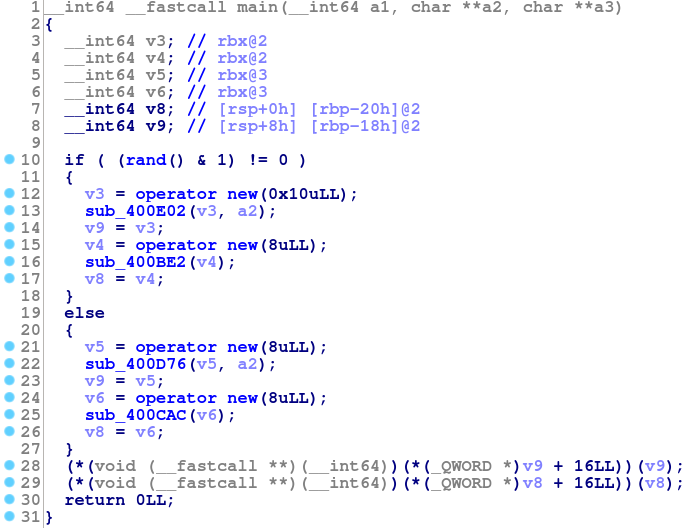
Here the virtual function calls are visible on lines 28 and 29. If we run
devirtualize, we can look at the Structures window to see what
the plugin has been able to recover.
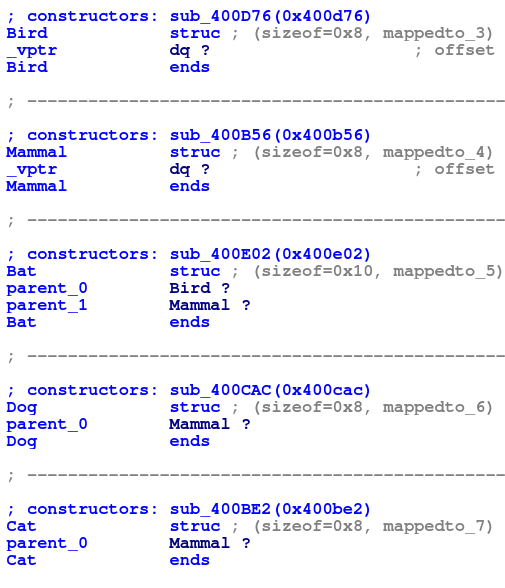
So devirtualize has correctly recovered the heirarchy, as well as the
names using RTTI (if RTTI was disabled, the plugin will generate default
names). Going back to the decompiled main output, we notice that lines
13, 16, 22, and 25 contain constructor calls (in future versions, devirtualize
may rename the constructor to make this easier to see). If we then set
a variable to one of these types, we can see the devirtualization. For example
if we mark v3 as a Bat*:

Notice that the virtual call on line 28 has been replaced with a normal function call. This function can be renamed, changed types, etc. It is as though a normal function call was actually there in source.
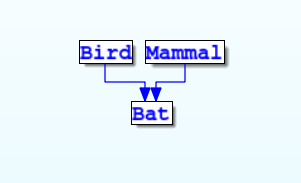
Viewing the Inheritance Graph
If the user right clicks on v3 after setting its type to Bat*, an additional
option “Open Ancestor Type Graph” will be available that will show an inheritance
graph: